A deep dive into the inner workings of JavaScript engines: writing code that makes V8 happy
I’m going to take you deep into the inner workings of V8 so you can understand how best to optimise all the JavaScript code you write day in, day out.
We're finally here. It's time for me to talk about browsers and V8.
Web browsers have been a passion of mine for... phew, quite a while now. And when I first started digging into how a browser actually works, I wanted to understand how web pages are loaded and, naturally, what actually runs all the JavaScript we spend our days writing.
Why is this worth caring about (beyond knowledge for knowledge's sake)?
- To understand what a browser actually does.
- To understand how it does it, and especially the different architectures involved (because not all browsers work the same way).
- More specifically, to understand how JavaScript runs inside our browsers so we can:
- optimise browser-side performance
- debug more effectively
- improve browser security
I've included a few hands-on exercises and things you can explore yourself because, honestly, I think it's a lot more fun that way. I encourage you to open up your browser, experiment as you read, and even spin up a small Node.js project to try out the V8 examples.
1. The basics: how does a browser work?
Before diving into V8, I think it's worth quickly revisiting a few fundamentals so we're all on the same page. (If you're already familiar with how browsers work and what a JavaScript engine is, feel free to skip straight to section 2.)
1.1 Processes and threads
A browser is just another application running on your computer. When you launch it, exactly the same thing happens as with any other application: it uses your machine's processes and threads, as well as your CPU (the brain of your computer) and GPU.
Exercise 0: Inspecting your browser's processes
One interesting thing is that browsers don't follow a standard architecture. Just as there are different applications for reading your emails (Mail, Gmail, Yahoo, and so on), there are different browser implementations. Not only do they differ from one another, but they also evolve rapidly over time. Some use a single process with multiple threads, others use multiple processes communicating with one another, and so on.
Le + de Dre Drey
1.2 Web engine vs JavaScript engine
Let's go back to how a web page gets rendered.
- The browser makes a request (fetching the content either from the server or from its cache).
- It starts parsing the HTML it receives.
- It processes the parsed HTML and the JavaScript to build the DOM (Document Object Model, the structure of the web page).
- It applies the CSS.
- Finally, it loads the media (images, videos, and so on).
Boom. You (almost) have a web page.
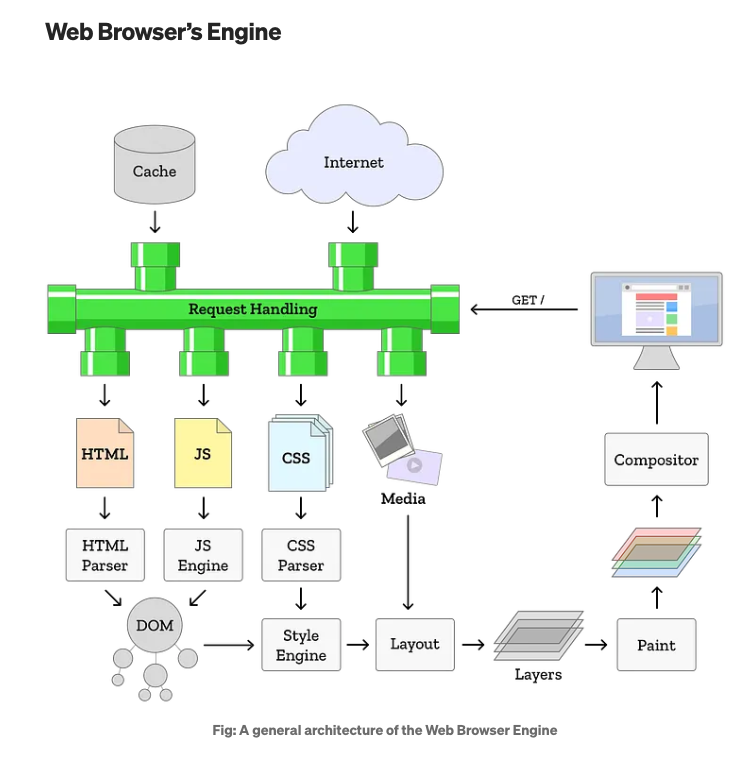
This diagram does a great job of illustrating the difference between a web engine and a JavaScript engine: the browser uses a JavaScript engine. So let's not mix up apples and oranges, as my grandmother would say. Take Chrome, for example (I promise I don't own any Google shares):
- Chrome is the name of the browser application.
- Chromium is the open-source project that the whole application is built on.
- Chromium uses Blink as its web engine.
- Blink uses V8 as its JavaScript engine.
A JavaScript engine is the component responsible for executing JavaScript code. It's one piece of the browser puzzle, but it can also be used outside browsers. V8 is one way of running JavaScript, but there are others: SpiderMonkey (used by Firefox), Nitro (used by Safari), and so on. Each engine is implemented differently, sometimes even in different programming languages, which means they all have different performance characteristics, strengths, and trade-offs. And because a JavaScript engine's job is simply to execute JavaScript, it can be embedded in many things besides browsers: Node.js, VS Code, and plenty of other software all use V8.
Covering every browser architecture and every JavaScript engine in detail would make this article impossibly long, so I've decided to focus specifically on V8.
2. Why focus on V8?
So why V8 rather than SpiderMonkey? Glad you asked! V8 is particularly interesting for several reasons:
- Because it's been adopted almost everywhere. It's the most widely used JavaScript engine today thanks to Chrome, but from day one it was designed as a standalone project with its own API, making it easy to embed elsewhere. It's used independently by Node.js, MongoDB, Electron (which powers VS Code, for example), and many other projects. As a result, it has had a massive influence on the JavaScript ecosystem.
- Because its documentation is public. Unlike many other engines, V8 has extensive technical documentation, along with detailed blog posts written by the team itself. As a complete beginner, I found that incredibly helpful: it allowed me to dig into the subject and get up to speed surprisingly quickly.
- Because its architecture is fascinating. The V8 team regularly introduces new optimisation tiers (Sparkplug in 2021, Maglev in 2023), and it's genuinely fascinating to follow. Its four-tier JIT compilation pipeline is going to be the star of this article.
Alright, I'm cheating a little bit here. The overall architecture and JIT compilation aren't really what make V8 unique anymore. Every modern JavaScript engine uses JIT compilation. SpiderMonkey (Firefox) has multiple JIT tiers with WarpMonkey, JavaScriptCore (Safari) follows a similar four-tier architecture, and even the old Chakra engine (Edge) did the same. JIT compilation itself is absolutely not a V8-specific feature.
What makes V8 such a great case study is the combination of its widespread adoption and its excellent public documentation. Together, they make V8 one of the best ways to understand how modern JavaScript engines work in general.
3. JIT, or the "I can do both" architecture
"Audrey, what's this JIT acronym you've been throwing around this whole time?" I hear you ask.
JavaScript is traditionally considered an interpreted language, but in reality it's also compiled. JIT (Just-In-Time compilation) speeds up execution because, as the name suggests, it combines interpretation with AOT (Ahead-Of-Time) compilation. In practice, this means the engine "reads" your JavaScript and dynamically mixes interpreting it with compiling it down to machine code.
This hybrid approach first appeared around 2015–2016 with the original pipeline made up of TurboFan (the compiler) and Ignition (the interpreter, originally introduced to reduce memory usage on Android phones). Between 2021 and 2023, that original Ignition–TurboFan pipeline gained two additional compilers, resulting in today's four-tier pipeline:
Ignition (interpreter) → Sparkplug (baseline compiler) → Maglev (mid-tier compiler) → TurboFan (top-tier compiler)
Le + de Dre Drey
4. The V8 pipeline, in detail
So how does it actually manage to both interpret and compile code?
- V8 starts by "reading" your code: it parses and validates it. If there are syntax errors, this is where they'll be reported.
- It then builds an AST (an Abstract Syntax Tree) from the source code (we'll come back to that later).
- Ignition (the interpreter) compiles the AST into bytecode and executes it instruction by instruction while collecting profiling information about the objects it encounters: how often functions are called, what types they receive, and so on.
Le + de Dre Drey
- Sparkplug (the baseline compiler, introduced in 2021): once a function becomes warm (called regularly), Sparkplug kicks in. It compiles roughly ten times more slowly than Ignition but generates basic native code without performing heavy optimisations. Sparkplug is essentially the "quick win": it translates bytecode into machine code with very little analysis. You already get a noticeable performance boost without paying too much compilation cost.
- Maglev (the mid-tier compiler, introduced in 2023): added in Chrome M117, Maglev sits between Sparkplug and TurboFan with a "good enough code, fast enough" philosophy. It compiles roughly ten times more slowly than Sparkplug but about ten times faster than TurboFan. Maglev performs real optimisations: it builds a control-flow graph, performs limited inlining, and so on, but without being as aggressive as TurboFan. It's the sweet spot for code that's fairly hot, but not yet performance-critical.
- Once a function becomes really hot (executed very frequently), TurboFan takes over. It performs aggressive optimisations: function inlining, dead-code elimination, type specialisation (if V8 only ever sees numbers, it'll generate machine code specialised for numbers), and optimisations based on object shapes (we'll get to those in a moment).
One of the strengths of JIT compilation is that the interpreter and the compiler constantly communicate. They mainly do this through two mechanisms: deoptimisation and recompilation.
The engine compiles the code, runs it, gathers information, recompiles it using that profiling data, for example type information, and eventually decides, "Hang on, this function is more important than I thought. Let's compile it again with more aggressive optimisations."
Of course, that optimisation assumes the function will keep receiving the same kinds of values. And that's not always true. If the function later starts seeing different types of objects, V8 has to deoptimise it.
If TurboFan optimises a function under the assumption that it always receives numbers, and then one day you pass it a string... boom: deoptimisation. V8 throws away the optimised machine code and falls back to a lower tier (Maglev, Sparkplug, or Ignition). We'll come back to that in more detail later.
5. How V8 optimises your code
Now we're getting to the heart of the matter: how does V8 make a dynamic language like JavaScript run so fast?
V8 relies on several optimisation techniques to speed up JavaScript execution. Let's look at some of the most important ones, along with practical examples you can try yourself.
5.1 Hidden classes: convincing JavaScript it has classes
In your head, you probably picture a JavaScript object as a dictionary: { name: "value", other: 42 }. Technically, that's true... but that's not how V8 actually stores objects internally.
Dictionary lookups are relatively slow. To make property access fast, V8 behaves as if JavaScript had classes. Whenever you create an object, V8 creates a "hidden class" behind the scenes that stores metadata about the object's structure.
Let's see what happens:
function Point(x, y) {
  this.x = x;
  this.y = y;
}
const p1 = new Point(1, 2);
const p2 = new Point(3, 4);
Step by step:
- When
p1is created, V8 creates an empty hidden class (let's call itC0). - When
this.x = xexecutes, V8 creates a new hidden classC1that says, "I have a property calledxat offset 0." - When
this.y = yexecutes, V8 createsC2, which says, "I havexat offset 0 andyat offset 1." - When
p2is created, V8 reuses theC0 → C1 → C2transition chain. Bothp1andp2end up sharing the same final hidden class.
These hidden classes (or shapes) form transition chains inside the JavaScript engine. An object starts with an empty shape, then transitions to a shape containing x, then another containing both x and y.
In other words, V8 knows the object's layout.
Why is that so great? Because if V8 knows that p1 and p2 share the same hidden class (that is, the same layout), it also knows that p1.x and p2.x live at exactly the same memory offset. No dictionary lookup required, it can jump straight to offset 0.
The catch:
const p1 = new Point(1, 2);
const p2 = new Point(3, 4);
p2.z = 5;
Now p2 no longer shares the same shape as p1. All the optimisations that relied on "every Point has the same layout" suddenly disappear...
Exercise 1: Visualising hidden classes
5.2 Inline caches: remembering previous lookups
Inline caching is an optimisation technique based on a simple observation: repeated calls to the same operation tend to receive the same kinds of objects. V8 therefore caches the result of the property lookup.
Consider the following code:
function getX(point) {
  return point.x;
}

getX(p1);
getX(p2);
getX(p3);
The first time getX is called:
- V8 knows nothing about
point. - It has to perform a full property lookup: determine the object's hidden class, figure out where
xlives, and so on. - Once that's done, V8 records both the shape it observed and the lookup result (for example, the property's offset) in an inline cache.
On subsequent calls:
- V8 checks: "Does this new object have the same hidden class as the last one?"
- If yes: fast path → V8 jumps straight to the cached offset. No lookup required.
- If not: slow path → V8 performs the full lookup again.
5.3 The different states of an inline cache
As execution progresses, an inline cache (IC) can become Monomorphic, Polymorphic, or Megamorphic, depending on how many different object shapes it encounters.
- Monomorphic: the IC has only ever seen one hidden class → optimal → fast property access and highly optimised code.
- Polymorphic: the IC has seen between two and four different shapes. V8 stores a small collection of hidden classes and their corresponding offsets → still optimised, but slightly slower because it has more cases to check.
- Megamorphic: the IC has seen five or more shapes → performance cliff → V8 gives up on caching altogether and falls back to performing a full lookup every time.
A concrete example:
function getX(point) {
  return point.x;
}

// Monomorphic: every point has the same shape
const goodPoints = [];
for (let i = 0; i < 1000000; i++) {
  goodPoints.push({ x: i, y: i * 2 }); // Always x then y
}

// Polymorphic: different shapes!
const badPoints = [];
for (let i = 0; i < 1000000; i++) {
  if (i % 2) {
    badPoints.push({ x: i, y: i * 2 }); // Shape A
  } else {
    badPoints.push({ y: i * 2, x: i }); // Shape B (different order!)
  }
}
Some articles report performance differences as high as 56× (for example, Matteo Malvica's article).
I'd temper that claim slightly: I wasn't able to reproduce numbers anywhere near that with my own small examples. Perhaps the difference becomes much more dramatic with larger codebases or more complex object hierarchies. It's also worth remembering that recent versions of V8 have significantly improved their handling of polymorphic and megamorphic inline caches, so the actual performance gap depends on both the V8 version and the workload you're running.
Exercise 2: Monomorphic vs Polymorphic
6. The optimisation/deoptimisation cycle
We've seen that V8 aggressively optimises your code. But what happens when its assumptions turn out to be wrong?
Whenever your code breaks V8's assumptions, by creating objects with different property orders, mixing types inside arrays, relying on highly dynamic patterns, and so on, you trigger what's known as a performance cliff. V8 is then forced to throw away the optimised machine code in a process called deoptimisation and fall back to a lower tier.
A classic example:
function add(x, y) {
  return x + y;
}

// V8 only ever sees numbers
for (let i = 0; i < 10000; i++) {
  add(i, i + 1);
}
// TurboFan optimises: "add performs integer addition"

// Then you pass strings
add("hello", "world"); // -> DEOPTIMISATION
V8 had generated machine code specialised for integer addition. Once it suddenly receives strings, it has to:
- Throw away the optimised code.
- Fall back to bytecode (or Maglev/Sparkplug).
- Execute the generic version instead (which is slower).
Deoptimisations typically result in slowdowns anywhere between 2× and 20×, depending on the workload. In tight loops or extremely hot code paths, the penalty can be much more severe (potentially 100× or more).
6.1 Deoptimisation hell
Deoptimisation hell happens when a function keeps being optimised and deoptimised over and over again during execution. After a few cycles, V8 eventually gives up and marks the function as non-optimisable.
Imagine the following scenario:
- V8 optimises
add()for numbers → TurboFan. - You pass a string → deoptimisation → back to Ignition.
- You start passing numbers again → V8 re-optimises → TurboFan.
- You pass another string → deoptimisation.
- ...
After repeating this a few times, V8 basically says: "Right, this function is impossible to optimise. I'm not wasting any more time on it."
You end up stuck with a slow version of add(), even if from that point on you only ever call it with numbers.
Exercise 3: Tracing V8 optimisations
6.2 A few optimisation killers
Some JavaScript patterns make V8 particularly unhappy. Here are a few of the usual suspects.
1. The delete operator
When you use delete, you're not just removing a property, you fundamentally change the object's layout in a way that can't be represented by a simple hidden class transition. Using delete forces V8 to switch the object into Dictionary Mode, where properties are stored in a slower hash-map-like structure.
// Not ideal:
const cache = {};
cache.user1 = { name: "Alice" };
cache.user2 = { name: "Bob" };
delete cache.user1; // the entire object switches to Dictionary Mode

// Better:
cache.user1 = undefined; // or null
2. Adding properties after initialisation
// Polymorphic nightmare
function Person(name) {
  this.name = name;
}

const p1 = new Person("Alice");
const p2 = new Person("Bob");

p1.age = 30; // p1 now has a different shape
p1.city = "Paris"; // and yet another shape

// Better: make it monomorphic from the start
function Person(name, age, city) {
  this.name = name;
  this.age = age || null;
  this.city = city || null;
}
Exercise 4: Measuring the impact of `delete`
3. Inconsistent property ordering
We've already seen this with { x, y } versus { y, x }. Property order matters, so I won't labour the point.
4. try/catch (although it's getting better)
Historically, having a try/catch inside a function prevented TurboFan from optimising it. Recent versions of V8 have improved this significantly, but it's still something worth keeping in mind.
7. Writing code that keeps V8 happy
Now that we understand the underlying mechanisms, here are a few golden rules.
7.1 Keep object shapes stable
Always initialise object properties in the same order so objects can share the same hidden class. Likewise, try to call functions with the same kinds of objects so inline caches can do their job.
// V8 is happy:
class Point {
  constructor(x, y) {
    this.x = x;
    this.y = y;
  }
}

// V8 is happy:
function createPoint(x, y) {
  return { x, y }; // Always the same property order
}
7.2 Avoid mixing types
// V8 is unhappy:
const mixedArray = [1, "two", { three: 3 }, null, undefined];

// V8 is happy:
const numbers = [1, 2, 3, 4, 5];
const strings = ["one", "two", "three"];
7.3 Don't use delete in hot code
As we've seen: delete → Dictionary Mode → performance goes out the window.
Use undefined or null instead.
7.4 Initialise every property
Even if some of them start out as null. That way the object's shape is fixed once and for all.
7.5 Write boring, predictable code
V8 rewards code that's predictable and stable, with consistent object shapes, and penalises code that's highly dynamic and constantly changing. Focus on writing "boring", monomorphic JavaScript that keeps the optimising compilers happy.
Code that constantly changes types, adds properties on the fly, or mutates object layouts is flexible : it's very "JavaScripty", but it's also slower.
Boring, repetitive, predictable code? That's the fast stuff.
8. Final bonus: the V8 garbage collector
You can’t talk about V8 without mentioning the Garbage Collector (GC), the system that automatically cleans up memory. But contrary to popular belief, understanding how it works can help you write more efficient code.
8.1 Young and old objects
V8 divides its memory heap into two main generations: the Young Generation (where new objects are allocated) and the Old Generation (where objects that have survived several GC cycles are promoted).
The Young Generation is itself divided into two:
- Nursery: newly created objects
- Intermediate: objects that have survived an initial GC
Why this separation? The generational assumption: most objects die young. Think of temporary variables in a loop, objects returned by a function, and so on. They are created, used, and then become redundant almost immediately.
8.2 The two garbage collectors
V8 uses two garbage collectors: the Scavenger, which frequently collects the young generation, and the Mark-Sweep-Compact, which collects the entire heap, including both the old and young generations.
The Scavenger (Minor GC):
- Uses a ‘semi-space copying’ algorithm: the young generation is divided into two halves (From-Space and To-Space). During execution, only one half is used to allocate objects. During a collection, live objects are copied from From-Space to To-Space WikipediaV8
- Extremely fast as it only processes the young generation (small, up to 16 MB)
- Very efficient for short-lived objects as the cost is proportional to the number of live objects, not to the total size of the heap V8
Mark-Sweep-Compact (Major GC):
- For the old generation (long-lived objects)
- More complex: marks live objects, sweeps away dead ones, and compacts memory
- Slower, but less frequent
8.3 Orinoco: parallelisation to reduce pauses
Orinoco is the codename for V8’s GC project (we can all agree that sounds a bit like ‘cocorico’, can’t we? But I digress...). The parallel Scavenger has reduced the total young generation GC time on the main thread by approximately 20–50 per cent, depending on the workload, according to several sources here and also here.
What this means in practice:
- The GC uses multiple threads in parallel
- Some phases run concurrently with JavaScript execution
- ‘Stop-the-world’ pauses are drastically reduced
8.4 Practical tips for being GC-friendly
1. Short-lived objects are free (or almost free)
Given the generational structure of the V8 heap, short-lived objects are actually quite cheap from a GC perspective, as we mainly pay for objects that survive.
// Good: temporary objects in a loop
function process() {
  for (let i = 0; i < 1000; i++) {
    const temp = { x: i, y: i * 2 }; // destroyed at the end of the iteration
    doSomething(temp);
  }
}
2. Avoid memory leaks
A DOM node is said to be “detached” when it has been removed from the DOM tree but is still referenced by JavaScript. Detached DOM nodes are a common cause of memory leaks.
// Memory leak
let cache = [];
function addElement() {
  const div = document.createElement(‘div’);
  document.body.appendChild(div);
  cache.push(div); // div remains in memory even after remove
}
document.body.removeChild(div);

// Clean up your references
cache = [];
Exercise 5: Debugging memory leaks in Chrome DevTools
3. Do not keep unnecessary references
// Uncleared event listeners
element.addEventListener(“click”, handleClick);
// if element is removed from the DOM, handleClick keeps it alive

// Clear
element.removeEventListener(“click”, handleClick);`
Conclusion
You might say, “Yes, but your whole article is about JavaScript, Audrey; today we’re working with TypeScript, which handles typing and optimises the code.” Well, sort of: TypeScript disappears at compile time, so the code running in V8 is still pure JavaScript.
TypeScript doesn’t ‘make V8 happy’ on its own, but it can help us write code that does make V8 happy: by typing objects, for example, we can ensure that all instances of that object have the same properties in the same order. We can also avoid the above example of deoptimisation hell by typing function arguments to prevent passing strings to functions that expect numbers.
But TypeScript is only useful if used properly. If you write:
function add(a: number | string, b: number | string) {
  return a + b;
}
It works perfectly well in TypeScript; it won’t give you any warnings, and the code compiles without errors. But it will be exactly the same scenario as seen above: the union type will result in polymorphic behaviour at the V8 level.
Similarly, any completely negates the protection: TypeScript doesn’t complain (well, it can, and indeed should, but unfortunately it’s entirely up to you), but V8 finds itself in the worst-case scenario.
Good use of TypeScript and V8-friendly code are two sides of the same coin. When you write rigorous TypeScript (no any, no broad union types on hot paths, precise interfaces), you get JavaScript that V8 can optimise aggressively, almost for free. But TypeScript alone guarantees nothing.
Ultimately, whatever the tool, it’s the intention behind it that counts :).
Ressources
I didn't write this article entirely on my own, and, in all humility, what I've said here has already been said and written by others, in different ways, with different angles. Here are the main contributions that helped me understand V8 and write this article, and I strongly encourage you to check them out if you want to continue exploring the topic:
- V8 blog
- V8 blog,Celebrating 10 years of V8
- Biro, Jonathan. 2019. Browser Engines: Chromium, V8, Blink, Gecko, WebKit
- Hinkelmann, Franziska. 2018. JavaScript engines how do they even?
- Jindal, Rahul. 2025. Understanding Just-In-Time (JIT) Compilation in V8: A Deep Dive
- Leka, Mirza. 2023. Evolution of Server-Side JavaScript
- Maret, Adrien. 2023. Comprendre le fonctionnement d'un moteur Javascript, Montpellier Tech Hub
- McMurdy, Hans. 2020. A Brief History of JavaScript
- Singh, Rahul Pratap. 2023. Web browser's engine
- Turckheim, Vladimir de. 2025. The video Exotic JS: Garbage Collection in Javascript and the talk Javascript Memory APIs, with a bit of V8